Google just dropped the Android 16 QPR2 update for its Pixel phones, and it’s packed with useful features you’ll actually care about. From AI-powered notification summaries to new parental controls and custom icon shapes, this update isn’t just about security patches—it’s a real usability upgrade.
Let’s cut into everything that’s new, what models get it, and why this could make your Pixel phone feel smarter and more personal.
Notifications
Let’s face it — notifications can get overwhelming. That’s where one of the biggest upgrades comes in: AI-generated notification summaries.
This new feature will automatically summarize long texts and group chats, helping you catch up without reading walls of text. It’s perfect for anyone who’s in too many WhatsApp groups or Slack channels.

But that’s not all. Google is also introducing a notification organiser that will automatically group and silence low-priority notifications. Think of things like promo emails, news updates, and social media alerts — they’ll no longer constantly buzz your phone.
So yes, less noise, more signal.
Customisation
Pixel users love the clean UI, but now you’ll get even more control over how your phone looks.
Here’s what’s new in the customisation department:
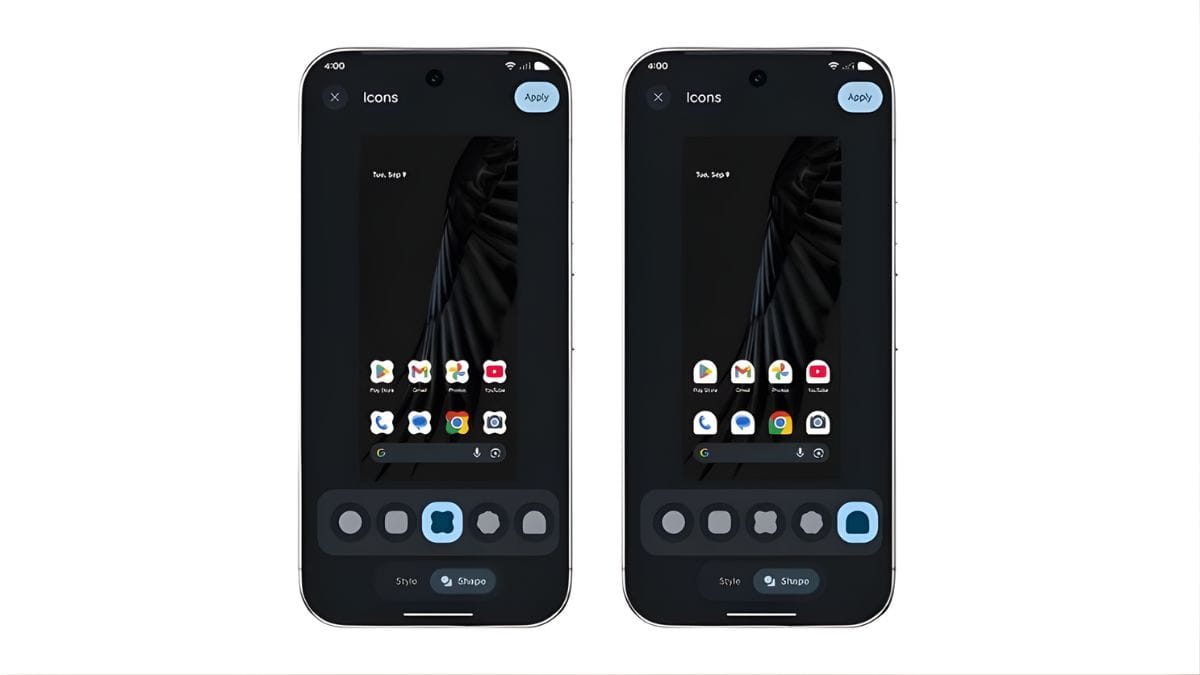
- Five new icon shapes to choose from
- Theming options for app icons across the home screen
- System-wide dark theme that applies even to apps that don’t support dark mode natively
This dark theme update isn’t just for style — it helps with eye comfort and can also save battery life on OLED screens. It’s a win-win for night owls and power users alike.
Parental
If you’re a parent, you’ll love what’s coming with Android 16 QPR2.
Google has streamlined all parental control options into one easy-to-find place under Settings and Google Family Link. The new controls include:
- Daily screen time limits
- Downtime schedules to lock devices at bedtime
- App-specific time limits or full blocks
- One-tap extensions for screen time or breaks
This means you can limit TikTok to 30 minutes, automatically lock the phone at 9 PM, and add 10 more minutes if homework runs late — all without hunting for settings across menus.
And unlike before, these tools are easy to access and change on the fly. That’s a major improvement for families juggling digital boundaries.
Security
With every Android Quarterly Platform Release, you also get the latest security patch — and the December 2025 update is no exception. It strengthens the phone’s defenses against known threats, vulnerabilities, and exploits.
No flashy icons here, but essential under-the-hood protection that keeps your Pixel safe and smooth.
Availability
Google hasn’t shared an exact rollout schedule, but the update is already rolling out in phases to eligible Pixel devices. That means newer Pixel models will get it first, with others following shortly after.
If you haven’t seen the update yet, head to:
Settings → System → System update
…and check manually.
If your phone is eligible, it should be there soon.
The Android 16 QPR2 update isn’t just a bug-fixer — it brings real, quality-of-life upgrades to Google Pixel phones. With AI notifications, deeper personalisation, and enhanced parental controls, Google is making the Pixel ecosystem smarter and more user-friendly with every update.
If you’re already on a Pixel, you’re in for a much smoother, more personalised ride.
FAQs
What is Android 16 QPR2?
It’s a quarterly update with AI features, UI tweaks, and security fixes.
Which phones get Android 16 QPR2?
Select Google Pixel models are eligible for this update.
What are AI notification summaries?
They summarise long texts and chats using AI for quick reading.
Are there new parental controls?
Yes, screen time limits, app blocks, and downtime schedules are added.
Can I change app icon shapes now?
Yes, you can pick from five icon shapes and apply themes.